


Key Highlights
- SAP training for beginners fails when users are overloaded with information and lack hands-on practice.
- A structured, role-based learning model helps beginners build skills gradually and confidently.
- Simulation-based training allows users to practice real workflows safely before go-live.
- In-app guidance and continuous learning reduce errors and improve long-term adoption.
- Measuring adoption metrics ensures training effectiveness and highlights areas for improvement.
Introduction
Some of the most important tasks in modern businesses are supported by SAP systems. Finance teams use them to make sure reports are correct, procurement teams use them to handle buying and suppliers, and HR departments use SAP to keep track of employee data and payroll. SAP is a big part of everyday business operations because it handles so many different tasks.
A structured SAP training model can help businesses solve these problems. Instead of expecting employees to figure out how to use the system on their own, companies can give them step-by-step instructions. Over time, this helps people feel surer of themselves.
Assima Train is one solution that supports this method by giving beginners real SAP training that lets them practice real workflows in a safe setting while they learn the system at their own pace.
1. Why SAP Training for Beginners Often Fails
A lot of companies spend a lot of money on SAP implementation, but they don’t think about how new users will learn how to use it. So, training programs don’t always get people ready for what will happen in real life.
Too much information is another problem. SAP systems have a lot of modules and functions, and new users often get too much information at once. They should be able to learn a lot of new things quickly instead of just doing their daily tasks.
It’s also harder to learn when you don’t have real-world examples. Training can teach you how SAP works, but it doesn’t always show you how it can make business processes easier. It’s hard for people who are just starting out to see the big picture because they don’t know how workflows work between departments.
The practice settings are another issue. Many businesses don’t have training systems that are simple to use and let workers safely practice transactions. This means that new people have to learn while they are working on live systems, which makes it more likely that they will mess up.
Lastly, training usually stops when the system goes live. Beginners forget what they learned in training sessions if they don’t get any help.
These problems make things harder for businesses:
- Less trust from users
- More mistakes in operations
- More reliant on IT help
SAP implementations take longer to pay off.
Adoption is much harder without a structured training model for beginners.
2. What Makes a Successful SAP Training Model?
A good SAP training model builds skills gradually instead of giving beginners too much information all at once.
Structured learning is the first part. Beginners should start by learning the basics, like how to use the SAP interface and get around the system. Once they are comfortable with these basics, training can move on to managing workflows and doing tasks.
Another important thing is training based on roles. SAP is used in different ways by different departments. While supply chain teams handle purchasing and inventory, finance teams may focus on financial postings and reports. Training should take these differences into account so that employees only learn the workflows that are important to their jobs.
A big part of training for beginners is also hands-on experience. Employees can do real SAP tasks without changing live data when they practice with simulations. Beginners build confidence by practicing workflows in a safe setting before using them in real systems.
Getting assistance in real time makes learning even better. When people get step-by-step instructions while working in SAP, they are less likely to make mistakes. This kind of help makes sure that new users can do transactions correctly, even when they are faced with new problems.
It’s just as important to always learn new things. SAP systems grow when they get updates, configuration changes, and new business processes. Training that happens all the time makes sure that workers are still comfortable with the system even when things change.
Organizations can create a beginner SAP training model that supports long-term use when these principles are combined.
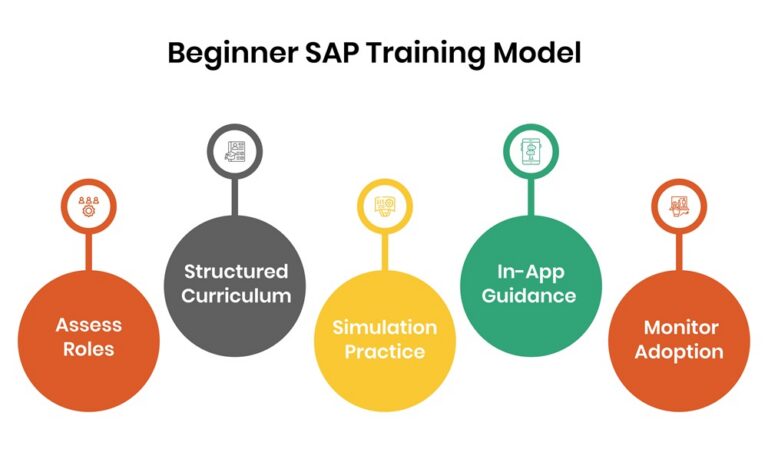
3. Step-by-Step Model for SAP Beginner Training
Organizations can follow a structured approach to train new SAP users effectively.
Step 1: Assess Roles
The first thing you need to do is figure out how employees use SAP. Training should start by figuring out the daily tasks of each team because they all do different things.
For instance, finance teams may need to learn how to record and report financial transactions, while procurement teams may need to learn how to manage vendors and purchase orders. Training teams can make learning paths that fit real job needs if they know what these duties are.
Step 2: Build a Structured Curriculum
Once roles are clear, training programs should be broken down into easy-to-follow steps.
Basic system training may include learning how to navigate, get to know the interface, and understand SAP terms. After this step, students can start working on the main tasks that are part of their job.
Next, you should practice in real-life situations. This stage lets beginners do tasks that are like what they would do in a real business. The last step gets users ready for go-live by making sure they can do their daily tasks with confidence.
Step 3: Use Simulation-Based Training
With SAP training that uses simulations, beginners can practice tasks without messing up real data.
Users can run workflows over and over, try out different actions, and learn from their mistakes without any risk. This way of teaching is better than regular demonstrations because it teaches things that they can’t.
Employees can also learn at their own pace with simulation training, which helps them remember what they’ve learned.
Step 4: Enable In-App Guidance
Providing contextual support directly within SAP is another important part.
Users can get help with tasks as they work in the system by following step-by-step instructions. These prompts help new users do their workflows correctly and make mistakes less likely.
In-app guidance is also a way to learn because users can get help even after their formal training is over.
Step 5: Monitor Adoption
Companies should keep an eye on how well their workers use SAP after they have been trained.
Teams that train people can tell if their programs are working by looking at things like how many people finish, how many mistakes they make, and how much more work they get done.
Businesses can make their SAP training plan better and fill in any gaps in what users know by keeping an eye on these signs.
Explore how NPower simplified SAP training and improved its outcomes with simulation-based learning
4. How Assima Train Supports SAP Training for Beginners
Assima Train helps organizations deliver practical SAP training that prepares beginners for real system use.
Interactive SAP simulations are one of its main features. The platform can make copies of SAP environments so that employees can practice real workflows in a safe space. The environment acts like the real system, so users get to practice in a way that is very similar to how they would work in real life.
Another advantage is the safe learning environment. Beginners can complete transactions, test different actions, and repeat tasks without affecting production data. This removes the fear of making mistakes while learning.
Assima Train also supports global training at scale. Large organizations often need to train employees across multiple locations and languages. The platform enables consistent learning experiences for teams worldwide while allowing training content to be adapted for different roles.
This approach helps employees reach proficiency faster. Instead of learning only through theory, beginners build confidence through repeated practice before they begin working in live SAP systems.
5. Measuring Success in Beginner SAP Training
Organizations should measure the effectiveness of their SAP training programs to ensure they support long-term adoption. Tracking the right indicators helps teams understand whether employees are truly gaining confidence and using the system correctly.
| Metric | What It Indicates | Why It Matters |
|---|---|---|
| User Engagement | The level of participation in training modules and learning activities. | High engagement shows that employees find the training relevant and useful for their daily work. |
| Workflow Accuracy | How correctly users complete SAP transactions and workflows. | Fewer errors indicate that employees understand system processes and can perform tasks confidently. |
| Support Ticket Volume | The number of help desk requests related to SAP tasks. | A decrease in support requests suggests that users can solve issues independently and rely less on IT teams. |
| System Utilization | How frequently departments use SAP features and workflows after training. | Active system usage indicates stronger user confidence and better adoption across the organization. |
Conclusion
The people who use SAP every day are the ones who will decide if it works or not. When beginners are told to figure out complicated workflows on their own, they are likely to make mistakes and get confused. People get angry, things move more slowly, and they rely more on support teams over time.
A structured way to learn SAP can make that experience very different. Employees gain the confidence they need to work well within the system when they learn through role-based instruction, hands-on practice, and constant reinforcement.
Assima Train and other solutions make this process easier by allowing training based on simulations, guidance within the application, and learning programs that can be scaled up for global teams.
Companies that update the way they teach beginners about SAP are much more likely to get a lot of people to use it and get the most out of their investment in SAP.
Discover how Assima Train helps beginners learn faster with hands-on, guided SAP training.
Frequently Asked Questions
Let’s Answer Some of Your Questions.
The most effective way to train beginners in SAP is to combine structure with practice. Instead of overwhelming users with theory, organizations should introduce learning in phases starting with basics, then role-specific workflows, and finally real-world scenarios.
A strong beginner training approach typically includes:
- Role-based learning paths
- Hands-on simulation training
- In-application guidance for real-time support
- Continuous learning beyond go-live
This approach ensures users don’t just understand SAP, they can actually use it confidently in their daily work.
Simulation-based SAP training makes learning practical instead of theoretical. Beginners can perform real workflows, like posting transactions or managing orders, in a safe, controlled environment without affecting live data.
This has multiple benefits:
- Users learn by doing, not just watching
- Mistakes become learning opportunities, not risks
- Confidence improves before go-live
- Knowledge retention is significantly higher
As a result, employees are better prepared to handle real SAP tasks from day one.