

Key Highlights
- Contextual in-app guidance helps users resolve questions without leaving the application, reducing dependence on the helpdesk.
- Assima In-App Search automatically identifies the user's screen and role to deliver relevant guidance at the moment of need.
- The same content created in Assima Train powers post-go-live guidance, eliminating duplicate content maintenance.
- Combining simulation-based training with in-app guidance creates a continuous digital adoption journey from pre-go-live learning to post-go-live support.
- Reducing routine support requests allows IT teams to focus on high-value issues while improving software adoption across the organization.
Introduction
Between 40 and 60 percent of helpdesk tickets in a typical enterprise come from users who can’t complete a routine task in their enterprise software. Most of those tickets are answerable in under 30 seconds if the right guidance is available at the right moment. It rarely is.
Assima In-App Search is an overlay widget that sits on top of any live enterprise application. It automatically identifies the user’s current screen and role, then surfaces contextual, role-based guidance from the Assima cloud without the user leaving the application, opening a new tab, or raising a ticket.
The result: users resolve queries independently, right where they’re working. Helpdesk teams stop answering the same 20 questions in a loop. And the return on your software rollout starts showing faster than you expected.
This article breaks down exactly how that happens with the specific mechanism behind Assima In-App Search, the business outcomes it delivers, and how it fits alongside simulation-based pre-go-live training to create a complete adoption lifecycle.
The Helpdesk Problem No One Talks About
Why Helpdesk Tickets Spike After Every Software Rollout
It’s a pattern that plays out after nearly every enterprise software launches. Users complete training, pass their assessments, and show up on day one then freezes when the actual system in front of them doesn’t look quite like the training material did. Three weeks later, they can’t recall step 7 of a 12-step workflow they used once in a sandbox environment.
The help desk inherits that gap. Tickets pour in for the same small set of recurring tasks. Agents who expected to handle genuine system issues end up re-explaining purchase order creation for the fifteenth time that week.
Legacy knowledge bases make this worse, not better. They’re usually out of date, impossible to search by screen or task, and critically not accessible from inside the application where the user actually needs the answer. The user has to stop what they’re doing, open a browser, search, hunt through a PDF, and then try to remember what they found when they switch back. Context breaks. Errors compound. More tickets follow.
The Hidden Cost of Helpdesk Dependency
Research by Gloria Mark at UC Irvine found that a worker who is interrupted loses around 23 minutes of focused work before returning to the original task at the same level of concentration. Every helpdesk call triggered by a routine software question burns that time for the user who called, and for the agent who answered.
Scale that across thousands of employees and a few hundred tickets a week, and the arithmetic gets uncomfortable fast. This isn’t a staffing problem. It’s a guidance-architecture problem. The support load exists because guidance is not available at the point of need, so users escalate instead of self-serving.
The downstream costs compound: reduced user confidence, slower task completion, higher error rates, and a software ROI that keeps getting pushed further out on the timeline.
Why Traditional In-App Help Doesn’t Fix This
Most enterprise applications come with some version of built-in help. It almost always falls short for the same reasons.
- Generic tooltips are not role-based or screen-specific. A Finance Manager and a Warehouse Operative see the same tooltip in the same field, even though they’re doing completely different things with it. Irrelevant guidance reduces trust faster than no guidance.
- Systems are often customized to fit specific business processes, therefore generic help content offered by systems, just confuse users as help doesn’t reflect your specific business needs.
- Static knowledge bases require users to leave the application. That context switch breaks workflow and means the user arrives at the answer after the moment they need it.
- Chatbots, even AI-powered ones, frequently fail on workflow-specific, screen-specific questions that require understanding of the user’s current position in a multi-step process. They handle FAQs reasonably. They don’t handle ‘I’m on step 4 of this invoice approval and the system is behaving unexpectedly.
The gap between what built-in help delivers and what users actually need is exactly where helpdesk dependency lives.
How Assima In-App Search Works
The Two Search Modes: Automatic and Manual
Assima In-App Search operates through two complementary modes, and the distinction between them matters to understand why it works where other tools don’t.
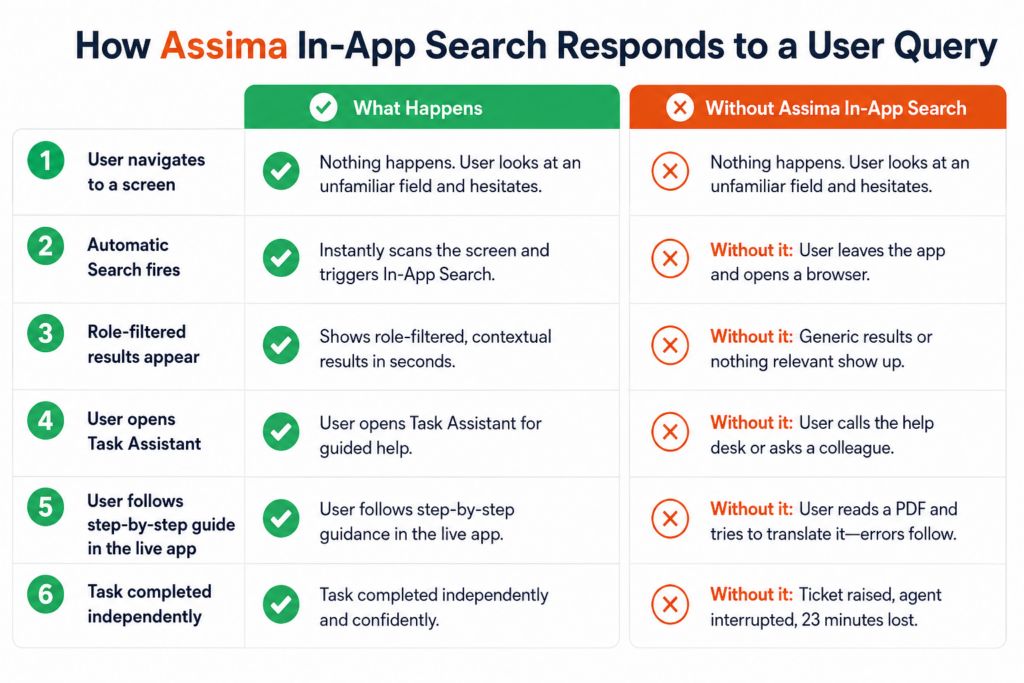
Automatic Search activates the moment a user navigates to a screen in the live application. Assima identifies the current application and screen automatically, then searches the Assima cloud and surfaces content that is contextually relevant to that screen and the user’s role without the user typing a single character. The guidance arrives before the user even formulates the question.
Manual Search handles cases where the automatic results don’t answer the specific question. As the user types a query, real-time suggestions appear. Results are filtered by current application context and role, so a query typed from inside the SAP accounts payable module surfaces AP-specific guidance, not a general SAP manual.
The widget itself is non-intrusive. It sits as an overlay icon on the live application, activated only when the user needs it. It doesn’t interrupt the workflow or compete for screen real estate with the task at hand.
See Assima In-App Search working inside SAP, Oracle, and Workday. Role-based results, automatic context detection, Task Assistant all in one factsheet.
Role-Based Results: Why Context Is Everything
The same screen in SAP means entirely different things to a Finance Manager, an AP Clerk, and a System Administrator. Generic help systems ignore that. Assima doesn’t.
Results are filtered by the user’s defined role. A Finance Manager sees finance-specific guidance. An AP Clerk sees AP-specific guidance. A System Administrator sees configuration notes. The guidance that appears is relevant to the job the user actually does which is the single biggest reason generic help systems fail and why Assima’s contextual filtering produces a measurable reduction in ticket volume.
When users trust that the first result they see is relevant to their task, they use the tool. When they’ve learned that the tool surfaces irrelevant content, they skip it and call the help desk. Role-based filtering is what makes the difference between a tool that gets used and one that gets ignored.
The Task Assistant: Step-by-Step Guidance Inside the Application
The Task Assistant is a sub-feature of Assima Train that handles the most complex support scenario: a multi-step workflow the user hasn’t done recently enough to remember confidently.
Instead of describing the process in text the user has to translate into action, the Task Assistant provides step-by-step walkthroughs of complex workflows inside the live application. Users follow the steps without leaving the system no side-by-side PDF, no alt-tab, no browser tab with an outdated manual.
A 12-step invoice approval in SAP becomes self-service. A compliance-sensitive data entry process in Oracle becomes navigable without a supervisor looking over someone’s shoulder. Low-frequency tasks that users rarely memorize stop generating tickets, because the guidance that makes them self-serviceable is available right where the task happens.
What Content Powers In-App Search
The guidance content that Assima In-App Search surfaces is authored and stored in the Assima cloud. The same content created in Assima Train the simulation-based training environment used for pre-go-live preparation can be surfaced directly in In-App Search after go-live.
That means one content creation effort serves two purposes. Training simulations built for pre-launch practice become in-app guidance in the live system. When a process changes and a training module is updated in Assima Train, that update automatically reflects in In-App Search. No duplicate maintenance. No version control problem with two separate content libraries drifting apart.
Assima In-App Search works on any web-based enterprise application SAP, Oracle Cloud, Salesforce, Workday, Microsoft Dynamics, ServiceNow, and custom or homegrown systems. It’s application-agnostic by design, and setup requires no code and no integration with the application itself.
The Business Impact
Helpdesk Ticket Reduction: The Primary Outcome
The most direct result of deploying Assima In-App Search is a drop in helpdesk ticket volume for routine software queries. This happens through a straightforward mechanism: most helpdesk tickets come from a small set of recurring workflows. When in-app guidance covers those workflows, tickets for those queries don’t get raised.
Organizations that have deployed Assima have seen substantial reductions in this ticket category. One NHS hospital deploying Assima reported that 80% of helpdesk calls declined after deployment. The mechanism isn’t a mystery: the guidance met users at the moment of need, inside the application, before the frustration threshold that triggers a ticket call was reached.
The downstream benefit for L&D and IT teams is significant. Helpdesk resources stop being consumed by routine guidance and can be redirected to genuine system issues configuration problems, access errors, integration failures the things that actually require a human expert.
Error Rate Reduction
Users who access guidance at the point of error course-correct immediately. They don’t continue down an incorrect path for four more steps before realizing something’s wrong; they see the right approach while they’re still on step one.
This matters most in financial systems, where the cost of an error isn’t just the time to fix it. An incorrect GL code, a misfiled vendor record, or a wrong currency setting in an SAP transaction doesn’t just create a rework task. It can trigger downstream processes of payments, reconciliations, and compliance records that compound the original mistake. In-app guidance at the point of data entry prevents the initial error rather than detecting it downstream.
Faster Time to Independent Competency
Users supported by in-app guidance reach independent workflow competency faster than users who rely on colleagues or the help desk to get through unfamiliar tasks. The guidance acts as a scaffold: users use it heavily in the first days after go-live, less frequently as the workflows become familiar, and only occasionally for the infrequent edge cases that never quite become habitual.
That gradual reduction in guidance dependency is the indicator of real adoption. Users aren’t just completing tasks; they’re building competency. That’s different from a user who completes the same task every week but still needs to call for help every time.
The Train Guide Continuum: How Assima Train and In-App Search Work Together
Pre-go-live and post-go-live are typically treated as separate problems with separate solutions. Assima connects them.
Assima Train builds workflow competency before go-live in a simulation environment that looks and behaves exactly like the live application. Employees practice real tasks, build real confidence, and arrive at launch having already done the work, not just watched a video about it.
Assima In-App Search sustains competency in the live system after go-live. When a user encounters a workflow, they haven’t done since training; the guidance is there. When a process update changes step 6 of a familiar workflow, the updated guidance is there too because it was updated once in Assima Train and automatically reflected in In-App Search.
Assima Train + In-App Search: Full Adoption Lifecycle
Phase | Assima Train | Assima In-App Search |
When it’s active | Pre-go-live: training environment | Post-go-live: live application |
What it does | Builds workflow competency through realistic simulation | Sustains competency with contextual, in-app guidance |
Who uses it | All users during onboarding or re-skilling | All users on the live system, day-to-day |
Content source | Authored once in Assima cloud | Same content no duplication |
Update process | Update once in Assima Train | Automatically reflects in In-App Search |
Helpdesk impact | Reduces launch-day ticket spike through better preparation | Reduces ongoing ticket volume for routine queries |
This is the core Assima product story: pre-go-live simulation training combined with post-go-live in-app guidance creates a continuous learning arc from the training environment to the live system one content layer, two functions, zero duplication.
Enterprise employees spend roughly 20% of the workweek searching for information they need to do their jobs. See how in-app guidance fixes that.
The Bottom Line
Helpdesk overload after a software rollout is not a people problem. It’s a guidance-architecture problem. Users need answers at the moment they’re stuck, inside the application where they’re working, filtered to their role and their current task. When that guidance isn’t available, they call the help desk. When it is, they don’t.
Assima In-App Search closes that gap by putting contextual, role-based guidance directly inside the live application. Automatic search surfaces relevant content before users formulates the question. Manual search handles the specific cases automatic results don’t cover. The Task Assistant walks users through complex workflows step by step without breaking their focus. And because the content is built once and shared between Assima Train and In-App Search, organizations get a complete adoption of lifecycle pre-go-live simulation training that builds competency, and post-go-live in-app guidance that sustains it.
The IT Directors and L&D Managers who have deployed this approach aren’t just seeing fewer tickets. They’re seeing faster time to competency, lower error rates, higher user confidence, and a software ROI that shows up on the timeline instead of getting pushed out indefinitely.
Want to see Assima In-App Search in action?
Frequently Asked Questions
Let’s Answer Some of Your Questions.
Assima In-App Search is an overlay widget that sits on top of any enterprise application. When users click the icon, it automatically identifies their current screen and role, then searches the Assima cloud to surface contextual, step-by-step guidance without the user needing to leave the application. Users access documents, training materials, FAQs, and guided walkthroughs right where they're working.
Automatic search identifies the user's current screen and role, then surfaces relevant guidance before the user has to ask for help. If the automatic results don't answer the question, manual search filters results by application context and role. Most helpdesk tickets come from a small set of recurring workflows. When in-app guidance covers those workflows, ticket volume for those queries drops to near zero. One NHS hospital deploying Assima reported an 80% reduction in helpdesk calls after deployment.
Assima In-App Search works with any web-based enterprise application SAP, Oracle Cloud, Salesforce, Workday, Microsoft Dynamics, ServiceNow, and custom or homegrown systems. It requires no code and no integration with the application itself. Setup is done through the Assima platform, and the widget deploys as an overlay on top of the existing application.
Assima In-App Search is Assima's in-app guidance product and one of the broader Assima digital adoption capability alongside Assima Assist. The key distinction from tools like WalkMe or Whatfix is that Assima In-App Search is search-led, and contextual guidance is surfaced based on the user's current screen and role. Users initiate or receive automatic guidance rather than following scripted product tours or overlay walkthroughs. It prioritizes finding the right answer fast over guiding users along a predetermined path.
Content is authored once in the Assima platform with the same content used in Assima Train simulations powers In-App Search. When a system update or process change requires a content update, it happens in one place and reflects everywhere automatically. There is no separate maintenance cycle for training content and live-system guidance. Assima supports SCORM-compatible content as well as Assima's native format.
No and it's not designed to. Assima In-App Search eliminates the high-volume, routine guidance queries that typically account for 40 to 60 percent of helpdesk ticket volume. Genuine system issues, data errors, access problems, and configuration failures still require IT support. The result is that helpdesk teams handle fewer tickets overall and can focus on the higher-value issues that actually need a human expert.