

Key Highlights
- Digital adoption platforms and simulation software solve different challenges and work best together rather than competing solutions.
- Simulation software builds employee confidence before go-live through realistic, hands-on practice in a safe environment.
- Digital adoption platforms provide contextual guidance after go-live, helping employees stay productive while reducing support dependency.
- Large ERP implementations, global software rollouts, and regulated industries often benefit from combining simulation-based training with in-app guidance.
- A connected adoption strategy that supports employees before and after deployment leads to faster time-to-productivity and stronger software adoption.
Introduction
If you’re in the middle of planning a software rollout and trying to figure out whether you need a digital adoption platform, simulation software, or somehow both – you’re not alone. During ERP, CRM, and digital transformation initiatives, this issue is frequently asked, and the answer isn’t as simple as most vendors would have you believe.
The Mistake That Derails Most Adoption Strategies
When software adoption becomes a concern, the instinct is usually to find one platform that handles everything – training, onboarding, in-app guidance, change management, support. One vendor, one contract, one problem solved.
It’s understandable. Project teams are stretched thin, budgets are tight, and the last thing anyone wants is another vendor relationship to manage.
But here’s what actually happens during a rollout:
- Depending on where they are in the process, employees have entirely different challenges.
- Prior to go-live, they are attempting to gain confidence and understand new workflows.
- They require assistance while navigating something that is still unfamiliar during go-live.
- After go-live, they require support and the occasional nudge when they encounter an unfamiliar situation.
There isn’t a single excellent tool for all three phases. Organizations that choose a single solution and declare it finished typically have a gap somewhere, which manifests as an increase in support requests, manager annoyance, and a slower-than-expected time-to-productivity.
The needs of a user who is familiar with a workflow but occasionally forgets a step are considerably different from those of a user who has never practiced it. One needs training. The other needs support. Treating those as the same problem leads you toward the wrong solution every time.

Where Digital Adoption Platforms Actually Shine
Before DAPs, employees dealing with an unfamiliar system had a few options: dig through documentation, ask a colleague, call the helpdesk, or try to remember what they learned in training three weeks ago. None of those were great.
DAPs solved this by bringing help directly into the application. Instead of leaving what you’re doing to go to find an answer, you get contextual guidance right where you need it – tooltips, step-by-step walkthroughs, inline prompts. You stay in the workflow, the work still gets done, and you don’t need to bother anyone.
For organizations running complex enterprise systems like SAP, Oracle, Salesforce, or Workday, this is genuinely valuable. Even experienced employees hit unfamiliar screens, and in-app guidance keeps them moving without pulling them out of the flow.
The benefits downstream are real, too. Support teams’ field with fewer repetitive questions. Employees become more self-sufficient. New features and process changes can be reinforced without scheduling another training session.
But here’s what DAPs don’t do well: they become useful only after employees enter the live system. By the time a tooltip shows up, the employee is already performing real work – often for the first time. That’s a lot of pressure, and for complex workflows, it’s often too late for guidance alone to fill the confidence gap.
That gap in the weeks before deployment? That’s where simulation software comes in.
Where Simulation Software Excels
Simulation software focuses entirely on what happens before go-live – and that timing difference matters more than it might seem.
Most employees are expected to absorb new software while still doing their actual jobs. They sit through training sessions, maybe watch a few walkthroughs, and then they’re expected to perform in the live system. For simple tools, that might work. For enterprise software with complex, occasionally-used workflows, it rarely does.
What actually builds confidence is repetition in a low-stakes environment. Simulation software gives employees a realistic practice space – one that mirrors the real system without any consequences for mistakes. Instead of watching someone else complete a process, they complete it themselves. Instead of reading instructions, they interact with the interface and get immediate feedback.
The timing advantage is huge too. Organizations can start training employees long before the production environment is ready. That removes one of the biggest stressors in any rollout – the mad scramble to get everyone trained right before launch.
A Dutch retailer that used simulation-based training ahead of a major ERP rollout reported full productivity from day one while cutting training costs significantly. Employees had already practiced their daily workflows before the system ever went live.
Npower’s SAP transformation showed similar results – simulation-based learning ahead of deployment cut onboarding time by 50% and reduced training overhead considerably. Employees walked into go-live already familiar with the processes they’d be running every day.
That’s the goal of simulation software: not just to explain how the system works, but to help employees feel comfortable before the pressure is on.
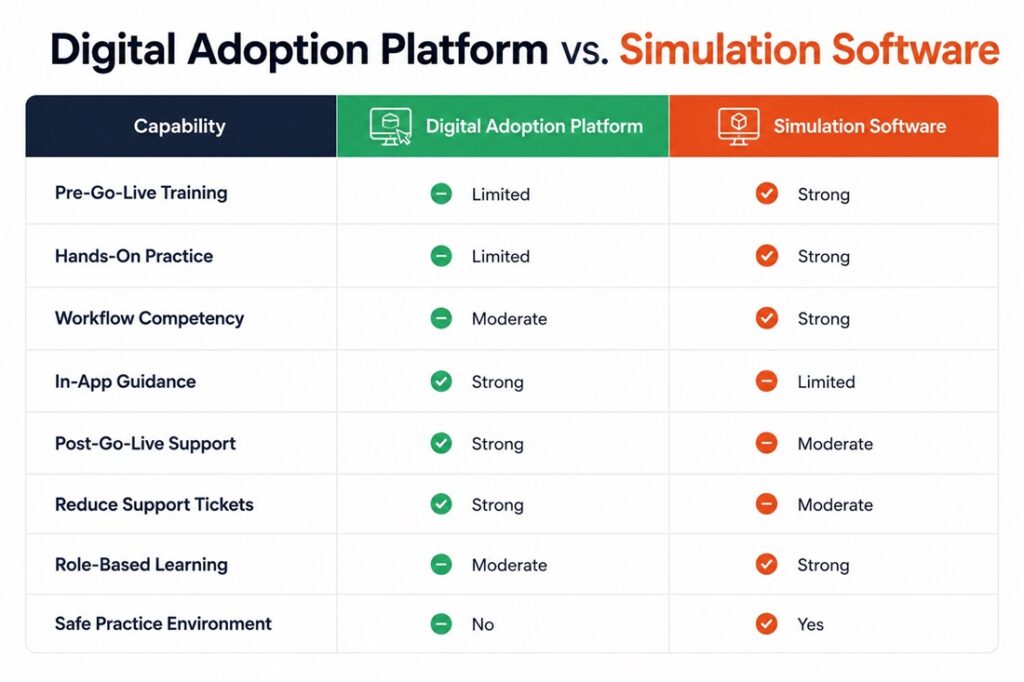
Why One Can't Replace the Other
This is probably the most common misconception in enterprise software training: that you can pick one and be covered.
Walk through what it actually looks like when you only have one of the two.
An employee learning a new SAP process with only a DAP enters the live system and gets guided walkthroughs. That’s helpful, but it’s also the first time they’re actually doing the task. They’re learning while real work is happening, which increases stress and slows output.
An employee who only had simulation software can practice extensively before go-live and arrive with genuine confidence. But once they’re in production, they may still need occasional reminders for infrequent workflows or new features added after their training wrapped up.
The organizations that consistently hit strong adoption numbers combine both. Employees build competency through simulation, then get performance support through a DAP. The transition from training to production becomes a lot smoother because employees aren’t encountering everything for the first time.
Why One Can't Replace the Other
This is probably the most common misconception in enterprise software training: that you can pick one and be covered.
Walk through what it actually looks like when you only have one of the two.
An employee learning a new SAP process with only a DAP enters the live system and gets guided walkthroughs. That’s helpful, but it’s also the first time they’re actually doing the task. They’re learning while real work is happening, which increases stress and slows output.
An employee who only had simulation software can practice extensively before go-live and arrive with genuine confidence. But once they’re in production, they may still need occasional reminders for infrequent workflows or new features added after their training wrapped up.
The organizations that consistently hit strong adoption numbers combine both. Employees build competency through simulation, then get performance support through a DAP. The transition from training to production becomes a lot smoother because employees aren’t encountering everything for the first time.
Learn how leading healthcare providers are accelerating adoption while reducing training burden.
When Do You Actually Need Both?
Not every software project needs both. A small team moving to a new CRM might be fine with guided onboarding and in-app tips. But several situations consistently call for a combined approach.
Large ERP Implementations – ERP systems touch multiple departments and user groups, often with hundreds of distinct workflows. Employees need hands-on practice before launch and ongoing support after deployment. One without the other usually shows up in your post-go-live support ticket volume.
Enterprise-Wide Digital Transformations – When thousands of employees need to change how they work, traditional classroom training doesn’t scale. You need a way to deliver realistic practice before launch and contextual guidance afterward, and those are two different problems.
Regulated Industries – Healthcare, financial services, government, pharma – these industries operate where mistakes have real consequences. Simulation software lets employees practice safely. A DAP reinforces compliance requirements inside the live system. Together they cover both readiness and ongoing accountability.
Frequent Software Updates – Cloud applications change constantly. New features and interface updates create a continuous learning need. Simulation helps with major changes, while a DAP handles the day-to-day adjustments.
How to Diagnose Your Own Adoption Gap
If you’re not sure where to focus, start by asking where your pain actually shows up.
Are employees struggling before go-live or after? Do support tickets spike right after deployment? Are employees getting enough opportunities to practice before launch – or are they going in cold? Is training completion being mistaken for competency? Are managers spending chunks of their day answering the same workflow questions?
Most of the time, the answers point clearly to either a readiness problem (simulation software is the gap) or a performance support problem (a DAP is the gap) – or both.
If both challenges exist, and for large rollouts they usually do, the strongest strategy combines the two.
The Bottom Line
Digital adoption platforms and simulation software aren’t interchangeable. They’re not even really competing for the same job.
Simulation software builds competency before go-live. It gives employees the practice, repetition, and confidence they need before real stakes are involved.
Digital adoption platforms sustain performance after go-live. They provide guidance in the moment, reduce support dependency, and keep employees productive as the system evolves.
One prepares people. The other supports them.
The organizations that get software adoption right aren’t the ones who found the best single tool. They’re the ones who stopped treating training and support as separate initiatives and built a connected strategy across the full adoption journey.
Explore how Assima supports software adoption across the entire learner journey.
Frequently Asked Questions
Let’s Answer Some of Your Questions.
It's most valuable during software onboarding, ERP rollouts, system migrations, and digital transformation initiatives where employees need hands-on practice before touching the live environment.