
Key Highlights
- Enterprise software now changes faster than training can keep up.
- Screenshot-based training is the hidden cost as every UI change results in a never-ending maintenance loop.
- Future-proof training rests on five foundations.
- Reusable content delivers measurable results.
Introduction
Enterprise software is always changing. Learning and development (L&D) teams are finding it more and more challenging to maintain up-to-date training materials due to the increased frequency of new features, interface upgrades, and process enhancements. Building training on reusable, object-based simulations that can be updated from a single source rather than constructed from scratch is the most efficient way to future-proof software training.
Whether you’re in charge of SAP, Oracle, Salesforce, Microsoft Dynamics 365, Workday, or another enterprise platform, keeping up-to-date training materials is now just as crucial as producing them. Creating educational resources is not the problem of today; rather, it is making sure those resources are still applicable after each software update.
Enterprise Software Is Evolving Faster Than Training Can Keep Up
The release cycles of cloud-based enterprise apps have significantly accelerated. Oracle Cloud offers quarterly updates, SAP S/4HANA publishes two major releases annually, Salesforce releases three major seasonal releases annually, while systems like Microsoft Dynamics 365 and ServiceNow consistently roll out improvements throughout the year. This presents a typical issue for L&D and IT teams.
A workflow that was flawlessly described six months ago might not be the same as what workers see on the screen now. Existing training can be quickly rendered inaccurate by a revised navigation menu, an extra approval step, or a renamed field. Now multiply that difficulty across:
- Hundreds of training modules
- Multiple business units
- Several employee roles
- Five or more languages
- Different regional business processes
All of a sudden, a minor program upgrade turns into a massive content maintenance undertaking. The end consequence is a cycle that many organizations are all too familiar with: another software release has already been released by the time one round of changes is finished.
The Hidden Cost of Screenshot-Based Training
The majority of training content is put together in a way that is more problematic than software updates per se. Screenshots and screen recordings are the foundation of traditional authoring tools. In essence, every screen is a static image that was taken at a certain moment in time. Those screenshots need to be manually updated whenever the application interface changes, no matter how small. This procedure frequently entails:
- Capturing new screenshots
- Updating annotations
- Editing interactions
- Re-recording demonstrations
- Republishing SCORM packages
- Testing each language version
- Uploading new files into the LMS
A seemingly little UI change can often result in dozens or even hundreds of manual modifications. According to industry estimates, rather than developing new learning opportunities, L&D teams spend a large percentage of their learning budgets maintaining current material. Instructional designers get caught in a never-ending cycle of modifications rather than concentrating on performance enhancement. As training libraries expand, this maintenance burden only gets heavier.
Object-Based Simulation: A Better Option
Reusable simulation tools adopt a radically different strategy. They take editable elements of the application’s interface rather than flat screenshots. Buttons are still buttons. Dropdown menus are still dropdown menus. Text fields are still editable.
Instead of rebuilding entire simulations, learning teams can update individual interface elements thanks to this object-based architecture. One object in the master content library may be modified if a field label changes. The update is automatically inherited by all simulations, practice exercises, assessments, role-based courses, and language versions that use that item.
As a result, software training becomes an ecosystem of linked, reusable information rather than a collection of discrete courses. Organizations maintain a single source of truth rather than reconstructing training after each release. Reusable simulation tools are becoming a crucial component of contemporary enterprise learning techniques because they are the basis for truly future-proof software training.
The 5 Foundations of Future-Proof Software Training
The goal of future-proofing software training is to build a training ecosystem that can easily adjust to change rather than anticipating every program upgrade. Enterprise learning libraries that are effectively maintained over time usually have one thing in common: they are designed with reusability in mind from the start. This is achievable by these five useful pillars.
1. Utilize Just One Source
Make everything from a single source rather than keeping separate files for tests, practice questions, demonstrations, PDFs, and language variations. Once the master simulation is updated, all outputs automatically reflect the modification. This minimizes redundant work, increases consistency, and greatly simplifies maintenance.
Workflow-Based Design
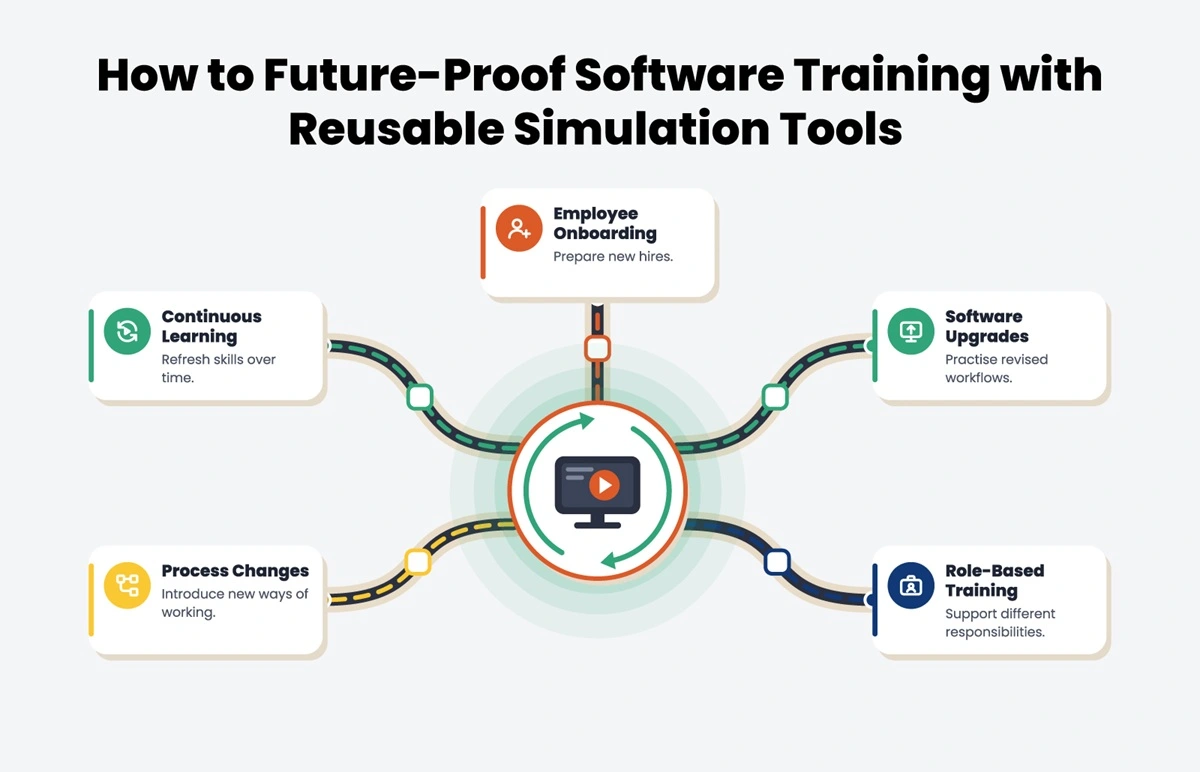
Instead of creating individual screens, create reusable simulations for entire business processes. The long-term value of any training asset can be increased by using a single workflow to handle role-specific learning, software upgrades, refresher training, and onboarding.
2. Update Once, Use Everywhere
With object-based simulation tools, you can make a single alteration to a user interface piece that will be automatically applied to all lessons that use it. With a single update, L&D teams can keep up with frequent product upgrades rather than manually editing several courses.
Keeping Up with New Releases
Ultimo, an Assima customer, synchronized training with biweekly product releases by using reusable screen elements and batch changes. The business demonstrated how reusing content makes ongoing maintenance easier by cutting the client adoption time from 50 to 40 days, providing training in five languages, and achieving an 8.3/10 satisfaction rating.
3. Translate Without Recording
Global organizations frequently find it difficult to maintain up-to-date multilingual training. By separating instructional content from the simulation itself, reusable simulation tools enable translation without re-recording. Once the source simulation is updated, the modification is automatically carried over to all language versions.
Encourage Global Learning
Organizations can localize without re-recording by building with localization in mind from the beginning, which lowers translation costs and guarantees that learners everywhere receive consistent, current training.
4. Utilize Training Across the Lifecycle of Employees
Use the same simulation with audience-specific instructions or tests rather of developing distinct courses for onboarding, refresher training, software upgrades, and compliance. This maximizes the return on training investments, minimizes duplication, and expedites the creation of content.
5. Prioritize Updates using Analytics
By highlighting learner errors, completion rates, and often-used workflows, analytics assist in determining which simulations need attention first. Training is kept accurate and current without needless updates by coordinating content evaluations with software release schedules.
How Assima Assists Businesses with Future-Proof Software Training?
The right technology and technique are essential for developing a reusable content strategy. Instead of taking static screenshots, Assima Train captures enterprise programs as editable, reusable objects using unique object-based cloning technology. Compared to conventional screenshot-based technologies, this allows organizations to update training from a single source, saving up to 50% on both content generation and maintenance time. Global organizations have already benefited from the platform’s assistance in modernizing software learning management.
Today, four out of ten Fortune 500 businesses rely on Assima for training, and they have saved over $3 million by substituting realistic software simulations for costly dedicated training settings.
Conclusion
Your training should keep up with the constant evolution of enterprise software. It doesn’t matter if applications change; what matters is whether your learning approach is designed to adapt. Businesses that keep using screenshot-based content will be trapped in a never-ending loop of having to rewrite courses with each update. Adopting reusable, object-based simulation tools allows users to refocus on learning impact rather than upkeep.
L&D teams can produce software training that is accurate, scalable, and economical for years to come by adopting a single-source content architecture, allowing global updates, supporting multilingual delivery without re-recording, reusing simulations throughout the employee lifecycle, and using analytics to direct continuous improvement.
Stop rebuilding training after every update. Book a demo of Assima’s reusable simulations.
Frequently Asked Questions
Let’s Answer Some of Your Questions.
Reusable, object-based simulations, as opposed to static snapshots, are the first step toward future-proof software training. When a single source of information is updated, it can be automatically reflected in many courses, learning modes, employee roles, and language versions. This method guarantees that training is in line with software changes while drastically reducing maintenance work.
Object-based simulation platforms enable authors to alter interface elements from a single central source instead of changing each course separately. Batch updates assist organizations in keeping up with frequent software releases by ensuring that changes are reflected across all relevant learning content.
Every time the interface changes, static images captured via screenshot-based training have to be manually replaced. Object-based simulations enable targeted adjustments without reconstructing entire lessons by capturing modifiable application pieces like buttons, fields, and menus.
Sure. Modern object-based simulation platforms enable organizations to translate without having to re-record by separating instructional content from the simulation itself. Multilingual maintenance is much more effective since language versions automatically inherit modifications made to the parent simulation.
Definitely. Simply by modifying the surrounding instructional content instead of reconstructing the simulation itself, a single simulation can support onboarding, refresher courses, upgrade training, compliance programs, and customer education.