

Key Highlights
- Traditional onboarding methods struggle to scale for enterprise-wide hiring and software rollouts.
- Leading enterprises combine simulation-based training, eLearning, and in-app support to onboard thousands of employees consistently.
- Hands-on practice in realistic simulations helps employees become productive faster while reducing training costs and support dependency.
- Building a scalable learning infrastructure enables organizations to keep pace with software updates, global expansion, and workforce growth.
Introduction
Mass employee onboarding is one of the most high-stakes operations in enterprise HR. Get it right and you accelerate productivity, protect your brand, and build a workforce that performs from day one. Get it wrong and you burn through your training budget, delay go-live dates, and flood your IT help desk with avoidable support requests.
This blog breaks down what actually works when you need to train large groups of employees fast – drawing on real results from global organizations that have done exactly that.
Why Traditional Onboarding Breaks Down at Scale
When companies hire at a normal pace, classroom training, one-on-one coaching, and shadowing sessions can work reasonably well. But when you scale up to hundreds or thousands of new hires at once, those approaches collapse under their own weight.
Instructors become bottlenecks. Training rooms fill up. Scheduling across time zones turns into a logistical nightmare. And every time the system changes, someone has to re-record videos, reprint manuals, and reschedule sessions from scratch.
The global airline that partnered with Assima dealt with this firsthand. Their team described creating dummy training flights for each individual learner as a very expensive and time-consuming way of delivering training. Each course cost roughly £7,000 to set up, and they ran multiple courses per day for months. They needed a fundamentally different approach – one that could replicate a live system at scale without the overhead.
Here are the four pain points that show up in almost every mass onboarding program:
- No safe space to practice. New hires who train on live systems risk making costly errors. Those who train only on slides or videos struggle when they face the real system on day one.
- Content that goes stale instantly. Many enterprises depend on screen recordings that become outdated the moment the software updates. Teams end up spending more time maintaining content than actually training people.
- Inconsistent learning across locations. When training depends on individual instructors, quality varies by site, region, and language. What employees learn in Texas can differ from what employees learn in California – or Copenhagen.
- Impossible timelines. Business acquisitions, new software rollouts, and rapid expansion do not wait for ideal conditions. L&D teams face brutal deadlines with fixed budgets and limited headcount.
How Leading Enterprises Actually Do It
The organizations that nail mass onboarding share a common shift in thinking. They stop treating training as a one-time event and start building a continuous, scalable learning ecosystem. They use technology to replicate live systems in a safe environment, track progress across cohorts, and keep content current without starting from scratch after every update.
Here are three real examples from Assima’s customer base.
Frontier Communications: $18.6 Million Saved During a Massive Acquisition
When Frontier Communications acquired Verizon’s wireline operations across California, Florida, and Texas, they inherited 9,400 Verizon employees and added 2,200 new hires – all of whom needed training on 11 systems across 12 functional areas. The L&D team had weeks, not months.
Frontier partnered with Assima and Accenture to build a blended learning program that combined web-based training with Assima simulations and job aids. Instead of pulling employees away from work for long instructor-led sessions, the team built a structured “Learn, Practice, Apply” approach. New hires completed eLearning modules independently, practiced in Assima’s simulation environment with zero risk to live systems, and accessed job aids exactly when they needed help on the floor.
The team delivered 1,362 eLearning courses, 300 simulations, and 412 videos and job aids. They trained nearly 30,000 people in total – including 18,000 existing employees who needed upskilling for system changes. Agents were taking live customer calls within the first week of go-live.
Results:
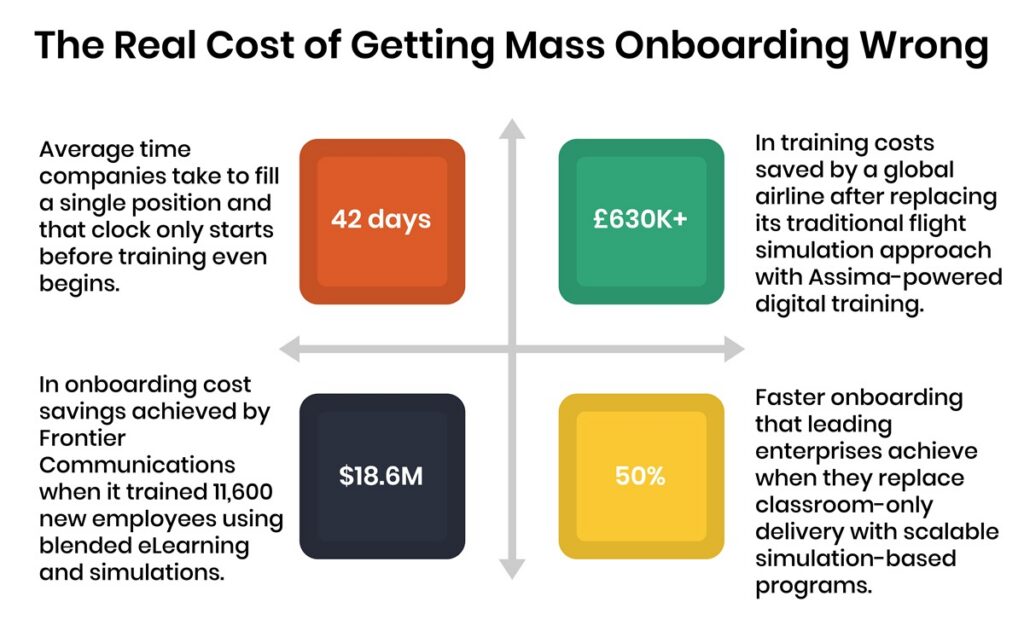
$18.6 million saved in onboarding costs
60,375 working days freed up from time away from the job
Nearly 30,000 employees trained across the full program
Read the full Frontier Communications case study:
Global Airline: 30% Shorter Courses and £630,000 in Savings
A leading UK airline needed to migrate 17,500 staff worldwide to a completely new check-in system in under six months. Their previous approach required creating individual training flights for each learner at a cost of roughly £7,000 per course. Running multiple courses per day made costs spiral fast.
After evaluating four vendors, the airline chose Assima because it was the only solution that could faithfully replicate their live application. Assima cloned the airline’s core software and the L&D team built 12 training modules in approximately 10 weeks. Learners accessed simulations online as self-guided refresher content. Training expanded to new locations – including international stations – without any additional classroom overhead.
The Flight Management course that once took three days dropped to two days, a 30% reduction, thanks to how intuitive the Assima environment felt to learners. More than 15,000 customer service colleagues completed the program across multiple sites.
Results:
£630,000+ saved by eliminating bespoke training flights
30% reduction in training course length
15,000+ staff trained across global locations
Read the full Global Airline case study
Ultimo: A 20% Faster Adoption Cycle and a 2026 Stevie Award
Ultimo delivers a cloud-based Enterprise Asset Management platform that releases new features every two weeks. That pace made traditional screen recordings impossible to maintain – every update required manual re-recording, editing, and translation into five languages.
By switching to Assima’s cloning technology, Ultimo built interactive, multilingual training that mirrored the live system dynamically. Stakeholders completed role-specific eLearning before deep-dive sessions, which shortened decision-making cycles. End users practiced in simulations that matched their actual workflows, which cut dependency on scheduled training sessions.
Average customer satisfaction climbed to 8.3 out of 10. The average onboarding-to-adoption timeline fell from 50 days to 40 days – a 20% improvement – and the program won the 2026 Stevie Award for Training Product of the Year.
Results:
- 8.3 out of 10 average training satisfaction score
- 20% reduction in adoption timeline (50 days to 40 days)
- Consistent training delivered across five languages
The 4-Stage Mass Onboarding Model
The case studies above point to a clear pattern. The most successful mass onboarding programs share a four-stage structure that separates learning into layers, each building on the last.
Stage 1 – Know: Build foundational awareness
Give new hires the context they need before they touch any system. This stage covers company culture, role expectations, compliance essentials, and a high-level overview of the tools they will use. Web-based training modules work best here because they scale without instructor overhead and learners can complete them at their own pace before day one.
Tools: Self-paced web-based training, video overviews
Stage 2 – Learn: Demonstrate how the system works
Show learners exactly what the software looks like and how key workflows run. Assima’s cloned environments deliver a faithful replica of the live system – including look, feel, and navigation – without any risk to production data. This is where screen recordings break down; simulation-based demos hold up because they update dynamically when the system changes.
Tools: System simulations, guided demos, cloned environments
Stage 3 – Practice: Let learners get hands-on
Move learners from watching to doing. Simulation environments let them complete real tasks – processing an order, checking in a passenger, filing a service request – with step-by-step guidance and no consequences for mistakes. This stage eliminates the problem where employees understood something in training but froze when the moment came on the job. Frontier’s program cut time away from the job by 60,375 working days by making this shift.
Tools: Interactive simulations, learning exercises, role-based scenarios
Stage 4 – Apply: Support performance on the job
Training does not stop when the formal program ends. Job aids, in-app search tools, and on-demand simulation modules give employees the reference support they need exactly when they need it – whether that is week two of a new role or six months in after a system update. Assima Assist places contextual guidance directly inside the live application so employees never have to leave their workflow to find help.
Tools: In-app guidance, job aids, on-demand simulations
See how healthcare organizations are building scalable training programs that accelerate software adoption.
What the Results Actually Look Like

What You Need to Make It Work
The framework above is straightforward once you have the right tools in place. But many organizations try to apply a modern onboarding structure using outdated infrastructure. These are the capabilities that separate programs that deliver from programs that stall.
Safe system replication. You need a training environment that faithfully replicates your live software without putting real data at risk. Learners who practice in environments that look close but not quite right build incorrect muscle memory. The closer the simulation to the real thing, the faster the transfer to actual job performance.
Content that updates efficiently. If your software changes every two weeks – or every quarter – your training content has to keep pace. Solutions that rely on full screen re-recordings collapse under that update cycle. Batch update tools let you change a workflow once and push it across every language and module at once.
Role-based learning paths. A check-in agent and a flight manager need different training even on the same system. Role-based curricula make sure each learner spends time on the skills that matter for their specific job, which keeps programs lean and keeps learners engaged.
On-the-job support after go-live. Employees who have access to in-app guidance – contextual prompts, searchable job aids, quick reference simulations – perform better and generate fewer help desk calls. Assima’s in-app search functionality surfaces the right training content directly inside the live application, exactly when employees need it.
The organizations that built the most effective mass onboarding programs – Frontier, the Global Airline, Ultimo – all prioritized these capabilities. They did not just buy training software. They built a learning infrastructure that could grow with their needs, absorb system changes without breaking, and deliver consistent quality across every region and language.
If your organization plans to hire large cohorts this year – through organic growth, acquisition, or a major software migration – the time to build that infrastructure is before the headcount arrives. Waiting until day one means everyone starts behind, and catching up costs far more than getting it right from the start.
Ready to build a smarter onboarding program?
Frequently Asked Questions
Let’s Answer Some of Your Questions.
It depends on the size of your workforce and the complexity of your systems. Organizations using traditional classroom-based training typically take anywhere from 6 to 12 weeks for large cohorts. Companies that shift to simulation-based blended learning cut that timeline significantly - often by 20% or more - without sacrificing consistency or quality.
The biggest time savings come from letting employees complete foundational learning before day one and giving them on-demand access to practice environments instead of waiting for scheduled sessions.
This is where traditional screen recordings fall apart. If your system updates every few weeks or every quarter, your team ends up re-recording, re-editing, and re-translating constantly. The better approach is cloning technology, which creates a dynamic replica of your live application that you can update in batches. One change pushes across every module and language at once, so your content stays current without a full rebuild every time the system evolves.