


Key Highlights
- SAP Enable Now employs a quote-based licensing model instead of using publicly available pricing.
- Both consumer and creator licenses have distinct functions and can affect total licensing expenses.
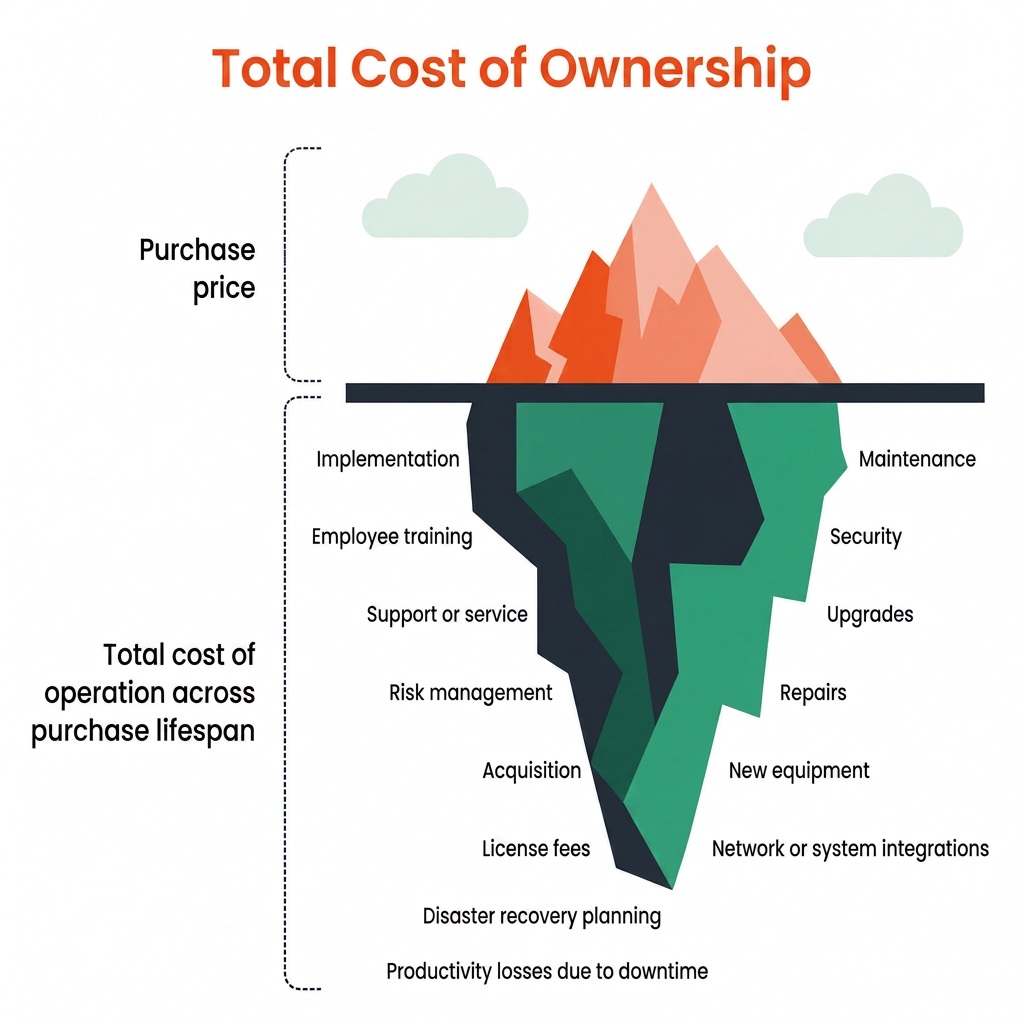
- Comparing license fees alone is not as clear as evaluating the entire cost of ownership.
- Your application landscape, deployment objectives, and long-term maintenance requirements will determine which training platform is appropriate for you.
Introduction
The short answer is that SAP does not make SAP Enable Now’s prices publicly available. Pricing is given upon request and is determined by several variables, including user volumes, deployment model, licensing structure, current SAP agreements, and negotiated commercial terms. This implies that two businesses of comparable size can get somewhat different quotes.
The right choice for your organization still depends on several things: whether you need training only for SAP or across non-SAP systems too, whether pre-go-live readiness or post-go-live adoption is your bigger challenge, how much existing content you can realistically carry over, and whether you want to stay inside the SAP ecosystem or go independent.
What SAP Enable Now Do and Where it Works?
It’s important to comprehend the purpose of SAP Enable Now before talking about cost. SAP’s own platform for digital adoption and content creation is called SAP Enable Now. It assists companies in producing educational resources that assist users before, during, and following software adoption. Common use scenarios consist of:
- Interactive walkthroughs
- In-application guidance through SAP Companion
- Process documentation
- Software simulations
- Knowledge articles
- eLearning content
- Performance support
Enable Now seamlessly interacts with SAP S/4HANA, SuccessFactors, Ariba, Concur, and other SAP cloud apps because it was created by SAP. Without leaving their workflow, users can obtain contextual help right within SAP apps that enable it.
This direct connectivity can make user acceptance easier and lessen the need for extra digital adoption tools for businesses that mostly operate within the SAP ecosystem.
| Where SAP Enable Is Now Effective | Where SAP Enable Is Not the Best Option |
|---|---|
|
SAP Enable Now works especially well when businesses wish to:
Organizations that have already invested in SAP technologies often value learning resources that are tightly integrated with the broader SAP ecosystem. |
SAP Enable Now has limitations, like any enterprise platform. Organizations often encounter challenges when they need to:
These limitations reflect the platform's intended scope rather than product flaws. Understanding them is essential when evaluating long-term value instead of focusing only on licensing costs. |
Pricing for SAP Enable Now: How the Licensing Model Operates
SAP Enable Now does not post the subscription cost on its website, in contrast to many SaaS products. Rather, companies receive tailored business propositions based on variables like:
- Deployment model
- Number of licensed users
- Existing SAP agreements
- Geographic region
- Enterprise purchasing terms
- Additional SAP products already licensed
Direct pricing comparisons are challenging. However, before engaging in business talks, buyers can comprehend the structure of SAP’s licensing method, including how SAP Enable Now per-user pricing may vary depending on licensing agreements, deployment model and negotiated commercial teams.
Named-User Permissions
SAP Enable Now is fundamentally based on named-user licensing. Licenses are given to specific users based on their roles rather than to the corporation as a whole. In the past, there were two main license categories for users of the on-premise edition. This licensing approach forms the basis of SAP Enable Now per-user pricing, where organisations buy license according to individual user roles and responsibilities.
Author (Creator) Licenses
The comparatively small number of users in charge of creating and updating training materials is the target audience for creator licenses. Usually, these users consist of:
- Learning designers
- Instructional designers
- SAP training specialists
- Platform administrators
- Content developers
Teams can record business procedures, create simulations, modify educational materials, distribute content, and manage knowledge assets with the help of creator licenses, which grant access to the writing environment.
Because Creator licenses contain the platform’s full authoring capabilities rather than just content access, they are generally more expensive than Consumer licenses, according to independent SAP experts like Enable Now Expert. When compared to the whole workforce, the number of Creator licenses in the majority of enterprises is still quite low, which can significantly influence the overall SAP Enable Now cost for large organisations.
End-user (consumer) licenses
Consumer licenses are intended for workers who merely require access to educational resources. These users are able to:
- View documentation
- Launch simulations
- Access knowledge articles
- Receive contextual guidance through SAP Companion
- Complete learning activities
These licenses are typically less expensive than Creator licenses in conventional on-premise deployments because consumers do not produce or control content. Organizations that deploy SAP to thousands or even tens of thousands of workers must nevertheless take into account the total cost of the license for their entire workforce.
Cloud Edition Permissions
SAP has streamlined licensing for its cloud deployment architecture. The cloud version employs a single licensing structure that covers both user roles, as opposed to dividing Authors and Consumers into distinct license types. This appears to produce a more straightforward business approach.
In actuality, businesses still need to assess if this strategy fits with their author-to-user ratio. For instance, a multinational corporation with 18,000 workers but only 15 instructional designers could seek to find out if a unified licensing model offers greater long-term value than separate Author and Consumer licenses.
SAP pricing conversations are usually addressed through bespoke quotations rather than published price lists because the answer relies on each organization’s setup.
Licensing to Outside Users
External access is another factor that is frequently disregarded in early assessments. Numerous organizations must offer educational materials to:
- Suppliers and Contractors
- Dealers and Franchisees
- Business Partners
- Temporary employees
Through SAP Companion, eligible external users can access material as part of SAP’s supplementary consumption option. But this isn’t a stand-alone purchase. Before granting external worker access, organizations must already possess SAP Enable Now licenses, which is a crucial factor for companies with extensive partner networks.
It’s worthwhile to talk about these license requirements during procurement rather than after deployment if your training strategy heavily involves external audiences.
Why Can It Be Challenging to Compare Quotes?
The idea that there is a fixed cost per user is one of the most common fallacies regarding SAP Enable Now pricing. In actuality, publicly accessible data and conversations within the SAP Community continually show that price is dependent on a variety of commercial factors. Typically, these consist of:
- User volume
- Contract duration
- Existing SAP relationship
- Product bundle negotiations
- Deployment model
- Enterprise discount levels
Therefore, organizations should use caution when comparing license data that is disclosed online or by other businesses. It is possible for two companies with comparable workforces to negotiate quite different business deals. Procurement teams frequently obtain more insightful information by asking the following questions rather than “How much does SAP Enable Now cost?”
Want to know more about how assima compares with SAP Enable Now?
Examining Ownership's Total Cost: Going Beyond the License Fee
The cost of a corporate training platform includes more than just the license charge. Over time, the overall budget could be significantly impacted by deployment, content maintenance, administration, and continuing support expenses. Because of this, companies assessing SAP Enable Now should take its total cost of ownership (TCO) into account instead of concentrating only on the initial quote. Looking beyond SAP Enable Now pricing helps organisations understand the true-long term investment.
1. Producing and Maintaining Content
Creating training materials is just the first step; most of the continuous work is in keeping them up to date. SAP Enable Now generates simulations and documentation using a screenshot-based methodology. Affected content usually has to be examined and changed to reflect the most recent screens and workflows when SAP interfaces change.
Following each SAP release, these changes could turn into a regular effort for companies that serve numerous user roles, business processes, or languages. Although these expenses are not included in the license price, L&D teams must continue to invest time and resources in them. These ongoing efforts contribute significantly to overall SAP Enable Now cost over time.
2. Implementation and Author Training
Setting up SAP Enable involves more than just installing software. It could prove necessary for organizations to set up governance, integrate SAP applications, configure SAP Companion, and provide content author training. Implementation frequently necessitates cooperation between IT, SAP administrators, and learning teams. However, the degree of work depends on the deployment and internal competence. The total investment should also account for the time spent developing content standards and training authors.
3. Facilitating Various Applications
SAP is used by many businesses in conjunction with programs like Salesforce, Oracle, Workday, or ServiceNow. The main purpose of SAP Enable Now is to support SAP environments. You might need an extra learning platform, more administration, content management, and maintenance work if your company additionally wants training for non-SAP apps.
4. Getting Users Ready for Go-Live
Before the production system is operational, many companies require staff members to practice business procedures. Once supported SAP systems are operational, SAP Enable Now offers efficient in-application guidance via SAP Companion. Organizations frequently supplement it with classroom instruction, sandbox environments, or simulation-based learning for pre-go-live preparedness. When evaluating platforms, it’s important to take into account how they provide training over the course of the implementation lifecycle in addition to license fees rather than only focusing only on SAP Enable Now user pricing.
Focus on Long-Term Worth
Instead of only comparing license models, inquire:
- How much work will it take to update information on a regular basis?
- Is the platform compatible with SAP and non-SAP applications?
- What tools are required for implementation?
- How will workers be trained prior to the launch?
A better understanding of the platform’s long-term worth and total cost of ownership can be obtained by responding to these questions.
Alternatives to SAP Enable Now: What Should You Compare?
Comparing license costs by itself won’t provide a whole picture when comparing SAP Enable Now to other training platforms. Organisations evaluating SAP Enable Now alternative should also consider long-term maintenance, application coverage and overall training strategy rather than focusing solely on license. Think over these important questions before deciding:
Is pre-go-live and post-go-live training supported by the platform?
After SAP releases, how simple is it to change content?
Is it compatible with both SAP and non-SAP applications?
Is it possible to effectively distribute content in various languages?
How much work is needed for implementation?
| Feature | SAP Enable Now | Assima |
|---|---|---|
| Best suited for | SAP-centric environments with in-app guidance | Enterprise software training across SAP and other business applications |
| Content approach | Screenshot-based simulations and documentation | Object-based software simulations |
| Pre-go-live training | Primarily supports live SAP environments through SAP Companion | Supports realistic training before go-live without relying on production systems |
| Application coverage | SAP applications | SAP, Oracle, Salesforce, Workday, Microsoft, and other enterprise applications |
| Content updates | Updates may require reviewing and revising affected content | Reusable object-based content helps simplify updates |
| Multilingual training | Supported | Translation without recreating simulations |
In general, neither platform is “better.” The priorities of your company will determine the best option. SAP Enable Now is a good choice if your main goal is to provide contextual help within SAP applications. A simulation-based platform might offer more flexibility if you’re overseeing enterprise-wide software training across several applications or require realistic pre-go-live practice environments.
Other Options to Take into Account
Depending on what you need, you can additionally assess:
Assima: Designed for enterprise simulation training, especially for companies that require practical experience prior to go-live or support training for both SAP and non-SAP systems.
Whatfix: It is a platform for digital adoption that focuses on in-app coaching for various workplace applications. It is frequently selected for workflow coaching and post-go-live user support.
Each solution addresses different business challenges, so evaluating them against your specific use cases is more valuable than comparing feature lists alone.
Conclusion
SAP Enable Now is a powerful tool, especially for those seeking to provide centralized learning resources and in-application guidance for businesses involved in the SAP ecosystem. Pricing for licenses is simply one aspect of the choice, though. Overall value is frequently more affected by long-term factors, including content maintenance, implementation work, support for non-SAP applications, and training prior to go-live.
Organizations can make a more informed investment that promotes effective software adoption long after installation is complete by assessing the total cost of ownership instead of concentrating only on per-user or per-author licensing. Whether selecting SAP Enable Now or SAP Enable Now alternative, evaluating long-term business requirement will lead to a more informed purchasing decision.