

Key Highlights
- User preparedness is just as important to the success of software rollouts as technical readiness.
- Provide every employee with a learning path that aligns with their actual work.
- User preparedness is just as important to the success of software rollouts as technical readiness.
- Track adoption, competency, and return on investment to keep improving training results.
Introduction
Technology, procedures, and schedules are frequently given a lot of attention in enterprise software initiatives. However, user preparedness is a crucial component that is often overlooked. No matter how strong a new ERP, CRM, or business program is, its success ultimately rests on how well people are able to use it right away.
A software simulation training program can help in closing that gap. Employees can learn and practice workflow in a risk-free, realistic setting that replicates the genuine software experience. Simulation-based training provides users with practical experience prior to entering the live system, in contrast to traditional training techniques that rely on presentations, films, or manuals.
Effective training is more important than ever. According to a Salesforce study, 76% of employees feel overpowered by the rate of technological change at work. User adoption is crucial to achieving software ROI as businesses continue to make significant investments in digital transformation projects.
Step 1: Set Clear Learning Goals
Define clearly what success looks like before developing any training materials. A common mistake made by many firms is to prioritize training completion over job performance. An employee may not be able to carry out their duties in the new system even after completing a course. First, determine:
- Who requires training?
- The tasks they need to do
- Which processes are essential to the business?
For instance, a finance user must handle bills and clearances, but a procurement specialist might need to draft purchase orders. Given the differences in their roles, their learning paths ought to be diverse. When establishing goals, prioritize results over activities. You can later assess the success of your training program with the aid of these quantifiable results.
It’s also worth reviewing any existing resources you already have, including eLearning courses, user guides, process documentation, and videos. Some content can be repurposed, reducing development time and effort. Checking your current resources, such as e-learning courses, user manuals, process documentation, and videos, is also worthwhile. Repurposing some information can save time and effort in development.
Step 2: Choose an Appropriate Simulation Method
Software simulations differ from one another. You may create a program that supports your training objectives by being aware of the available options.
Screenshot-Based Models
These instruct students through procedures using screens that have been captured. Although they are rather simple to make, they can easily become out of date if the application interface is modified.
Object-Oriented Simulations
Instead of using static graphics, this method captures underlying interface elements to produce a realistic reproduction of the software. A more realistic and dynamic learning environment is the outcome. Tasks can be practiced by users without requiring access to the live application.
Digital Adoption Platforms (DAPs)
After implementation, in-app guidance is provided by a digital adoption platform. Instead of instructing users before going live, it assists them while they operate within the live system. While they have diverse uses, DAPs and simulation training work best when together.
Step 3: Create Learning Paths Based on Roles
One-size-fits-all training does not work for everyone. While training, take into account the fact that different teams interact with software in various ways. Let’s look at a typical ERP implementation:
- Finance teams require reporting and invoicing workflows.
- Warehouse teams require procedures for inventory management.
- HR departments require employee-related transactions.
- Governance and configuration training is required for administrators.
Build role-based learning pathways that focus solely on the tasks relevant to each audience rather than developing a single training course. Three steps make up a useful framework for each simulation:
Show
The learner observes the procedure being carried out with direction and clarification.
Practice
The learner completes the process with assistance and guidance.
Analyze
The learner completes the assignment on their own, and their accuracy and completion are assessed.
This method encourages proper behavior while assisting learners in gradually gaining confidence. Early in the planning stage, multilingual delivery should be taken into account for multinational corporations. Postponing localization frequently results in inconsistent training experiences across locations, higher expenses, and project delays.
Step 4: Conduct Training Before Go-Live
The idea that development must wait until the system is properly set up is one of the most common misconceptions regarding software training. In actuality, training can often begin much earlier. Before the final production environment is available, training content can be created using vendor-provided systems, demo environments, or staging instances on modern simulation platforms.
This has a number of benefits:
- Training development and implementation go hand in hand.
- Users can start learning earlier.
- Project teams steer clear of a last-minute rush for training.
- Content can be updated more quickly when changes take place.
This parallel strategy significantly reduces deployment risk for large ERP programs. Additionally, it eliminates the necessity of relying solely on pricey training sandboxes that need constant upkeep and assistance.
Step 5: Pilot Before Scaling
Before rolling out training to hundreds or thousands of employees, test it with a smaller group. A pilot group of 20 to 50 users is often enough to identify issues. The goal is not simply to verify that the training works. The goal is to understand where learners struggle. Look for patterns such as:
- Common mistakes
- Confusing instructions
- Frequently abandoned exercises
- Low assessment scores
These insights allow you to improve the content before a wider launch.
Another best practice is establishing a network of change champions.
These individuals receive training first and become advocates within their departments. They help answer questions, encourage participation, and reduce pressure on L&D and support teams.
When it’s time to launch, consider a phased rollout:
- Pilot group
- Early adopter departments
- Organization-wide deployment
- Post-go-live reinforcement
This structured approach helps maintain quality while supporting adoption at scale.
Step 6: Measure Results and Demonstrate ROI
Training should never be viewed as a one-time activity. To demonstrate value, you need measurable outcomes.
Focus on metrics that reflect business performance, not just learner participation.
Useful KPIs include:
- Task completion rates
- Workflow error rates
- Time to competency
- Assessment performance
- Adoption rates after go-live
- Support ticket volumes
- Training cost per learner
These metrics provide a clearer picture of whether employees are actually prepared to use the software effectively.
Simulation-based training can also deliver measurable financial benefits.
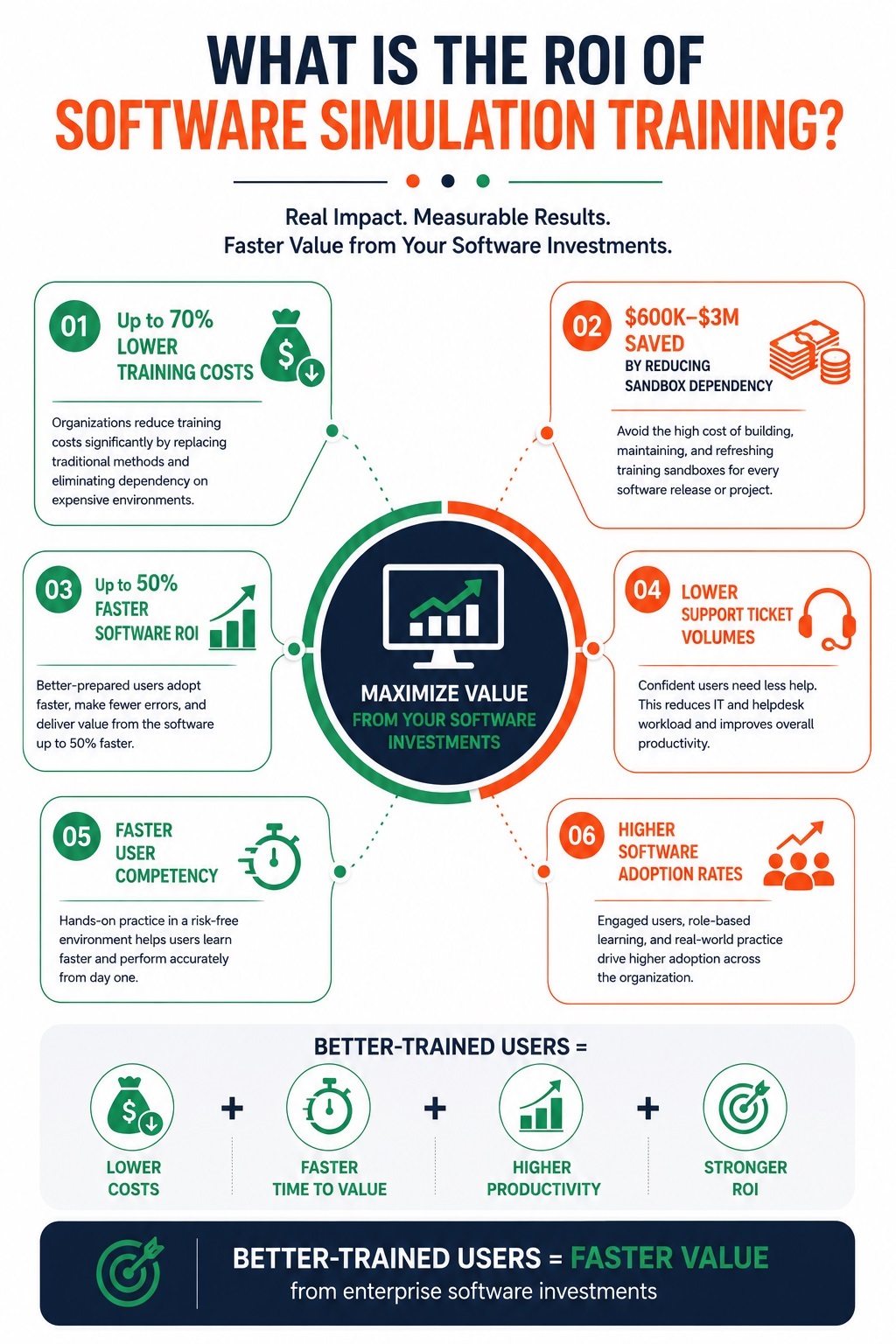
Organizations that replace traditional sandbox-based training approaches often reduce infrastructure and maintenance costs while improving learner readiness.
According to Assima customer data:
- Training costs can be reduced by up to 70%.
- Organizations may save between $600,000 and $3 million by reducing reliance on training sandboxes.
- Software ROI can be achieved up to 50% faster through improved adoption.
- Npower reported savings of approximately £3 million after replacing traditional SAP training methods.
- RSA achieved nearly £300,000 in annual savings while recovering 3,455 days of training time.
While results vary by organization, these examples demonstrate how effective training contributes directly to software adoption and business performance.
Final Thoughts
Developing training materials is only one aspect of building a software simulation training program. It’s about getting employees ready to do actual job with assurance and precision right away. The most effective programs begin with specific goals, emphasize role-based learning, offer practical experience, and track results that are important to the company.
Effective simulation training decreases risk, speeds up adoption, cuts support expenses, and enables businesses to get more out of their software investments more quickly. Organizations that engage in practical, scalable training programs will be better positioned to accomplish effective digital transformation results as corporate applications get more complicated.