

Key Highlights
- Effective EMR upgrade training lowers workflow errors prior to go-live, improving patient safety.
- Realistic EMR training is made possible by PHI anonymization, which protects private patient information.
- In-app guidance combined with pre-go-live simulations speeds up adoption and lowers needs for support.
- Safe practice environments improve knowledge retention and reduce user errors.
Introduction
Upgrades are now a standard component of digital transformation in the healthcare industry, regardless of whether a company employs Epic, Oracle Health, Cerner, Orbis, HiX, Oceano, Pics, or another EMR platform. Healthcare IT, clinical informatics, and learning teams must constantly train employees for new workflows because many large systems undergo substantial modifications several times a year.
Step 1: Understand the Stakes of Poor EMR Training
EMR Training Failures Are a Patient Safety Issue
In many industries, software errors can result in delays, inefficiencies, or financial losses. In healthcare, software mistakes can directly affect patient outcomes.
Errors in medicine administration, missing patient records, missed alerts, and documentation have all been associated with poor EMR proficiency. Research from healthcare safety groups, such as The Joint Commission has identified usability issues and training limitations have been frequently found to be contributing factors in adverse clinical occurrences. An EMR upgrade may introduce:
- New medication administration workflows
- Modified clinical documentation templates
- Updated order entry processes
- Changes to patient alert systems
- New reporting requirements
When clinicians are unfamiliar with these changes, the risk of workflow errors increases.
Why Upgrade Training Is Harder Than Initial Implementation
When implementing a new EMR, the majority of healthcare companies spend months planning. The preparatory timeframe for upgrade projects is rarely the same. Six to eight weeks before deployment, several significant updates are made public. Within a short amount of time, training teams must identify changes, produce materials, plan timetables, and verify preparedness.
Another difficulty is user perception. Employees frequently believe they are familiar with the system. As a result, compared to a full system rollout, people can misjudge the impact of an upgrade and participate in training less actively.
The Cost of Getting It Wrong
Organizations that underinvest in upgrade training frequently experience:
- Increased helpdesk volumes
- Higher support costs
- Reduced clinical productivity
- Workarounds and shadow processes
- Increased clinician frustration
- Elevated burnout risk
In healthcare environments already facing staffing shortages, asking clinicians to learn new workflows through trial and error is neither efficient nor sustainable.
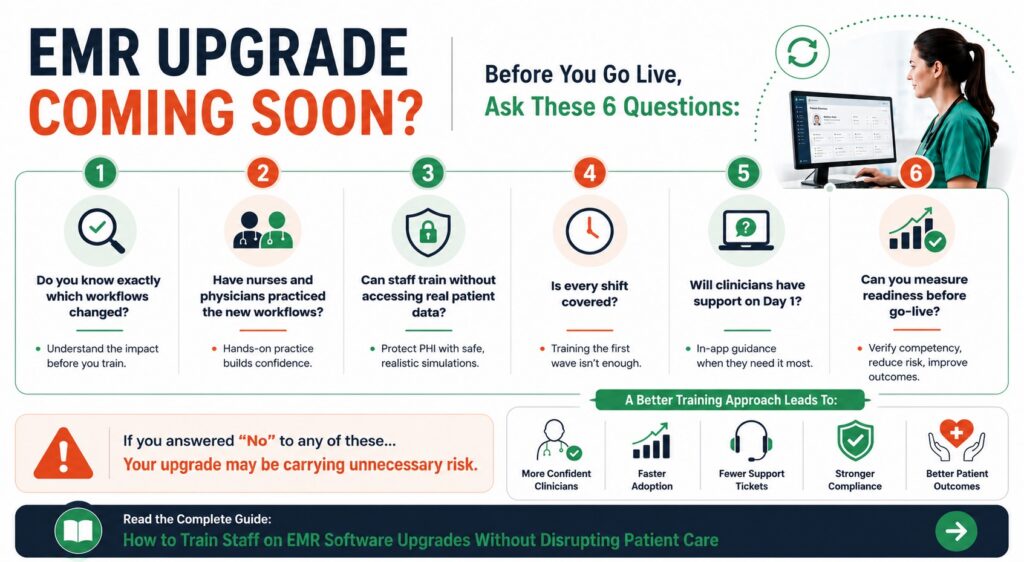
Step 2: Audit the Upgrade and Identify Who Is Affected
Not Every Change Affects Every User
One of the most common mistakes in healthcare staff training is requiring everyone to complete the same content.
An update on medication administration might mainly impact nurses. Enhancements to billing might solely affect revenue cycle teams. Staff scheduling might not be impacted by a change in physician paperwork.
Role-based training dramatically improves efficiency while reducing unnecessary learning time.
Conduct a Change Impact Assessment
Before developing training content, healthcare IT and clinical informatics teams should create a detailed impact matrix that maps:
- Changed workflows
- Affected departments
- User roles
- Risk levels
- Required competencies
For example:
Workflow Change | Affected Role | Risk Level |
Medication Administration | Nurses | High |
Order Entry | Physicians | High |
Scheduling Module | Administrative Staff | Medium |
Reporting Dashboard | Department Managers | Low
|
This assessment ensures training resources focus on the highest-priority areas first.
Prioritize Patient Safety Workflows
Not all system changes carry the same risk.
Organizations should prioritize training for workflows involving:
- Medication management
- Clinical documentation
- Provider order entry
- Care coordination
- Patient safety alerts
Administrative enhancements can often be supported with lightweight guidance after go-live.
Ready to improve EMR/EHR training across your organization? Explore Assima
Step 3: Build Simulation Training Without PHI Exposure
The PHI Challenge in Healthcare Training
One of the biggest barriers to realistic EMR training is protected health information (PHI).
Healthcare organizations cannot use real patient data in training environments without introducing significant compliance concerns. Regulations such as HIPAA in the United States, GDPR in Europe, and NHS data governance requirements in the United Kingdom place strict controls on patient information.
Traditional approaches often create a difficult tradeoff:
- Use fake data that feels unrealistic.
- Spend weeks manually de-identifying records.
Neither option is ideal.
Why PHI Anonymisation Matters
Modern simulation-based training platforms address this challenge by replacing sensitive patient information with realistic synthetic data.
Assima’s one-click PHI anonymisation capability enables healthcare organizations to automatically remove patient identifiers from simulations while preserving realistic clinical workflows.
This allows training teams to create highly authentic learning experiences without exposing sensitive information or requiring lengthy de-identification projects.
For healthcare IT leaders, this is often the key factor that makes simulation-based EMR training practical and scalable.
Build Training Before Go-Live
Timing is another significant issue with EMR updates. Staging or test environments are frequently made available to organizations weeks prior to production deployment. There is usually limited time for preparation because traditional training development waits until the finished system is available.
This procedure changes by simulation technologies. It is possible to gather training material from the staging environment and create it concurrently with upgrade testing. Training materials are finished by the time the production environment opens. This approach provides several advantages:
- Earlier training availability
- Reduced go-live pressure
- Faster content deployment
- Greater user readiness
Structure Clinical Simulations for Competency
The most effective clinical simulation programs generally include three stages:
1.) Show Mode
Users observe the updated workflow while receiving explanations and annotations highlighting what has changed.
2.) Practice Mode
Users complete tasks with guided assistance and contextual hints.
3.) Assess Mode
Users perform the workflow independently and demonstrate competency before using the live system.
This progression allows clinicians to build confidence safely before interacting with patient-facing environments.
Step 4: Deploy Training Around Clinical Schedules
Why Traditional Training Often Fails
Healthcare organizations operate continuously.
Fixed classroom sessions may work in corporate environments, but they create significant challenges in hospitals.
A training session scheduled at 10 a.m. may exclude:
- Night-shift nurses
- On-call physicians
- Emergency department staff
- Part-time clinicians
Every hour spent in a classroom is also an hour away from patient-facing responsibilities.
Adopt Asynchronous Learning
Self-paced simulation training provides greater flexibility.
Clinicians can complete modules:
- During scheduled learning time
- Between shifts
- During quieter operational periods
- On various devices
Short modules focused on specific workflow changes are often more effective than lengthy training sessions.
Many healthcare organizations find that 15–20-minute modules improve completion rates while minimizing operational disruption.
Use Role-Based Learning Paths
Training should align with actual job responsibilities.
Examples include:
- Nurses receive medication administration updates.
- Physicians receive order-entry training.
- HIM teams receive coding workflow updates.
- Administrative staff receive scheduling enhancements.
This targeted approach improves relevance and reduces unnecessary learning time.
Coordinate with Department Leaders
Successful hospital EMR go-live training requires collaboration between:
- Clinical informatics teams
- Nurse managers
- Department directors
- Medical leadership
- Learning and development teams
Managers should identify realistic training windows and establish completion expectations well before deployment.
A common best practice is requiring all affected staff to achieve competency 48 hours before go-live.
Step 5: Provide In-App Guidance During Go-Live
The First Two Weeks Matter Most
Even well-trained clinicians will encounter unfamiliar situations after an upgrade.
Research and operational experience consistently show that the highest-risk period occurs during the first days and weeks after deployment.
This is where performance support becomes essential.
Deliver Help in the Flow of Work
Instead of requiring clinicians to:
- Search manuals
- Open separate learning systems
- Contact support teams
Guidance should be available directly within the application.
In-app support tools can provide contextual assistance based on:
- Current screen
- User role
- Workflow stage
- Specific task being performed
This reduces interruptions while helping clinicians maintain focus on patient care.
Reduce Reliance on Helpdesk Teams
Many organizations experience significant spikes in support requests following upgrades.
By combining simulation-based training with contextual guidance, healthcare teams can reduce dependency on helpdesks while accelerating user confidence.
Support data should be monitored closely during the first 14 days to identify recurring issues and potential training gaps.
Step 6: Measure Readiness and Sustain Improvement
Track Readiness Before Go-Live
Effective healthcare staff training should be measurable.
Key readiness metrics include:
- Percentage of affected users trained
- Assessment completion rates
- Competency scores
- Department-level coverage
- Shift-level coverage
These indicators help identify gaps before deployment occurs.
Monitor Post-Upgrade Performance
Training success should also be evaluated after implementation.
Recommended metrics include:
- Helpdesk ticket volume
- Documentation accuracy
- Medication workflow errors
- Order-entry issues
- User satisfaction scores
Comparing these metrics with pre-upgrade baselines provides a clearer picture of training effectiveness.
Build a Sustainable Training Library
Healthcare organizations rarely perform only one upgrade.
Most systems evolve continuously.
For this reason, upgrade training should be treated as a long-term capability rather than a one-time project.
Organizations that maintain reusable simulation libraries can update content incrementally as workflows change, reducing development effort and accelerating future deployments.
Over time, this creates a growing knowledge base that supports onboarding, refresher training, EHR system onboarding, and future software rollouts.
Conclusion
Successful EMR software upgrades depend on more than technical implementation. They depend on whether clinicians can confidently perform critical workflows from the moment the updated system goes live.
Healthcare organizations cannot afford training approaches that pull staff away from patients, expose sensitive data, or leave users learning through trial and error.
By conducting a thorough change impact assessment, prioritizing patient safety workflows, using simulation-based training, anonymizing PHI, deploying role-specific learning, and supporting clinicians with in-app guidance, healthcare teams can achieve stronger go-live readiness while maintaining uninterrupted patient care.
As digital transformation in healthcare continues to accelerate, organizations that invest in structured EMR training programs will be better positioned to improve adoption, reduce support costs, strengthen change management in healthcare initiatives, and ultimately deliver safer, more efficient care.